How to Add Different Currencies Together (With Examples)
To add different currencies together, convert every amount into one currency first, then add. Worked examples, rounding rules and a faster way to do it.
You cannot add 120 USD and 85 SGD as raw numbers. Pick one currency for the answer, convert every amount into it at the same exchange rates, then add the converted amounts. Round only at the end, and note which rates and which date you used.
- Choose one target currency before you start, usually your home currency or the one you will pay in.
- Convert every amount into that currency, then add. Never add the raw numbers.
- Use the same set of rates for every line, and write down where they came from and when.
- Round once, at the end, using the decimal places of the target currency (yen has none).
- Mid-market rates are a fair reference, but your card or bank may charge a slightly different rate.
You have a hotel booked in US dollars, a dinner bill in Singapore dollars and a shopping receipt in Chinese yuan, and you want one number: how much did all of that cost? The method is simple, and it is the same whether you use a pencil, a spreadsheet or a calculator app. This guide walks through it with worked examples so you can do it confidently every time.
How do you add different currencies together?
Convert every amount into one currency, then add the converted amounts. That is the whole method. Amounts in different currencies are like measurements in different units: you would not add 3 metres and 4 feet and call it 7 of something. You convert first, then add.
- Pick a target currency. This is the currency your answer will be in.
- Get one set of exchange rates for every currency on your list, all from the same source and the same day.
- Convert each amount into the target currency.
- Add the converted amounts and round the total.
A worked example: USD, SGD and RMB
Say you spent 120 USD, 85 SGD and 300 RMB on a trip, and you want the total in Singapore dollars. Using example rates of 1 USD = 1.30 SGD and 1 RMB = 0.18 SGD (illustrative only, not today's rates):
The 85 SGD needs no conversion because it is already in the target currency. Notice what would have happened if you had added the raw numbers: 120 + 85 + 300 = 505, which is meaningless.
Which currency should you add everything up in?
Choose the currency that answers your actual question. The total is the same value whichever currency you pick, but the right choice makes it easier to act on.
- Your home currency when you are tracking a budget or deciding whether something was worth it. Your salary and savings are in it, so the number means something to you.
- The currency you will pay in when you are checking what to hand over, for example totalling several items in one shop abroad.
- A shared currency when a group is settling up. We cover that in detail in how to split a bill in different currencies.
A second example: online shopping in three currencies
Online orders are a common reason to add different currencies together. Suppose you are comparing a basket from three shops: 45 EUR, 30 GBP and 6,000 JPY, and you want the total in US dollars. At example rates of 1 EUR = 1.08 USD, 1 GBP = 1.27 USD and 1 USD = 150 JPY:
| Item | Example rate | In USD |
|---|---|---|
| 45 EUR | × 1.08 | 48.60 |
| 30 GBP | × 1.27 | 38.10 |
| 6,000 JPY | ÷ 150 | 40.00 |
| Total | 126.70 |
Watch the direction of each rate. If the rate is quoted as "1 EUR = 1.08 USD", you multiply euros to get dollars. If it is quoted as "1 USD = 150 JPY", you divide yen to get dollars. Mixing these up is a common mistake, and it gives an answer that is wildly too big or too small.
Tip: Sanity-check each line. Yen amounts look large but are worth much less per unit than dollars, so 6,000 JPY should come out far smaller than 6,000 USD. If a converted figure looks bigger than you expected, you probably multiplied when you should have divided.
How should you round when adding currencies?
Keep the full converted values while you add, then round the final total once. Each currency has its own convention: dollars, euros and pounds use two decimal places, while Japanese yen and Korean won are normally shown with none. Round your total to whatever the target currency uses.
Rounding each line separately is fine for a quick estimate, but on a long list the small rounding errors stack up. If you are reconciling expenses or settling money with friends, round at the end.
Where should the exchange rates come from?
Use one reference source for every line, ideally the mid-market rate, which sits halfway between the buy and sell prices banks trade at. It is neutral, widely published and easy to check. Our guide to the mid-market rate explains why it is the fairest yardstick and why you rarely get it at a counter.
Two things to keep in mind:
- Your real cost can differ. Card networks and banks apply their own rate when the payment settles, and some cards add a fee for foreign transactions. Policies vary by card, so check yours.
- Rates move daily. Write down the date of the rates you used. A total calculated last month will not match one calculated today, and that is expected.
How do you add taxes, tips or discounts in another currency?
Apply the percentage in the original currency, then convert. For example, an 80 EUR bill with a 10% service charge is 88 EUR, which you then convert like any other amount. Doing it in that order matches what you will actually be charged, because the merchant calculates the percentage in their own currency. If you want more practice with this, see percentages abroad: tax, tips and discounts.
Can you do this in a spreadsheet?
Yes. Put amounts in one column, the currency code in the next, and the rate into your target currency in a third. A fourth column multiplies amount by rate, and a sum at the bottom gives the total. Store rates in a single lookup table so each currency is defined once. The weak point is keeping those rates current, since you have to paste fresh ones in yourself.
How to add different currencies together in Calcurate
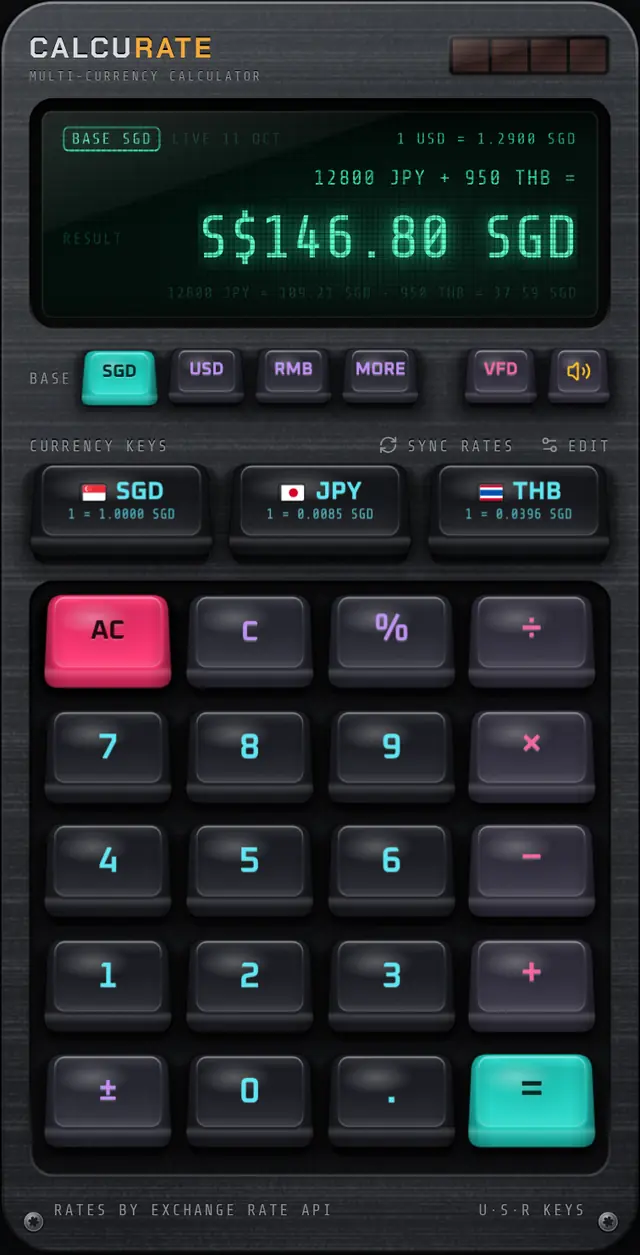
If you do this often, a calculator that understands currencies saves the conversion steps. In Calcurate you type the sum the way you would say it out loud. Type 120, tap the USD key, tap +, type 85, tap SGD, tap +, type 300, tap RMB, and press =. Every amount is converted into your base currency and added up.
(Using the same example rates as above. The app uses live mid-market reference rates and shows their source and date on the display.)
A few details make it practical for real lists:
- Below the result, a breakdown line shows each conversion, such as
120 USD ≈ 156.00 SGD · 300 RMB ≈ 54.00 SGD, so you can check every line. - Change the base currency while the answer is on screen and the total is recalculated in the new currency straight away.
- Tapped the wrong currency? Tap the right one immediately after and the amount is retagged.
- Percent works like a desk calculator, so
200 + 10%gives 220.
You can read more about how this works on the multi-currency maths page, or see the full list of supported currencies.
Common mistakes to avoid
- Adding raw numbers. 100 USD + 100 EUR is not 200.
- Flipping a rate. Check whether you should multiply or divide by looking at how the rate is quoted.
- Mixing rate sources. One rate from a bank site and another from a news site can give a total that matches neither.
- Forgetting the date. A total is only as current as the rates behind it.
- Treating the result as your bank's figure. It is a reference. Your statement may differ slightly because of card rates and fees.
For quick estimates when you have no phone to hand, the tricks in mental maths for currency conversion will get you within a few percent.
FAQ
Questions people also ask
Can you add two different currencies directly?
No. 100 USD plus 100 EUR is not 200 of anything. Convert both amounts into one currency first, then add the converted values.
Which currency should the total be in?
Use the currency that matters for the decision. That is usually your home currency for budgeting, or the currency you will actually be charged in when you are comparing what to pay.
Should I round each conversion or only the total?
Keep full precision for each conversion and round only the final total. Rounding every line can push the total off by a few cents or more on long lists.
Why does my bank statement show a different total?
Your card network and bank convert at their own rate when the payment is processed, which may not be the day you paid, and some cards add a foreign transaction fee. A calculator using mid-market rates gives a reference figure, not the exact amount you will be billed.