FAQ
Calcurate questions, answered
Everything about multi-currency calculations, exchange rates, widgets, keycaps and privacy. Still stuck? Contact support.
FAQ
All questions
What is Calcurate?
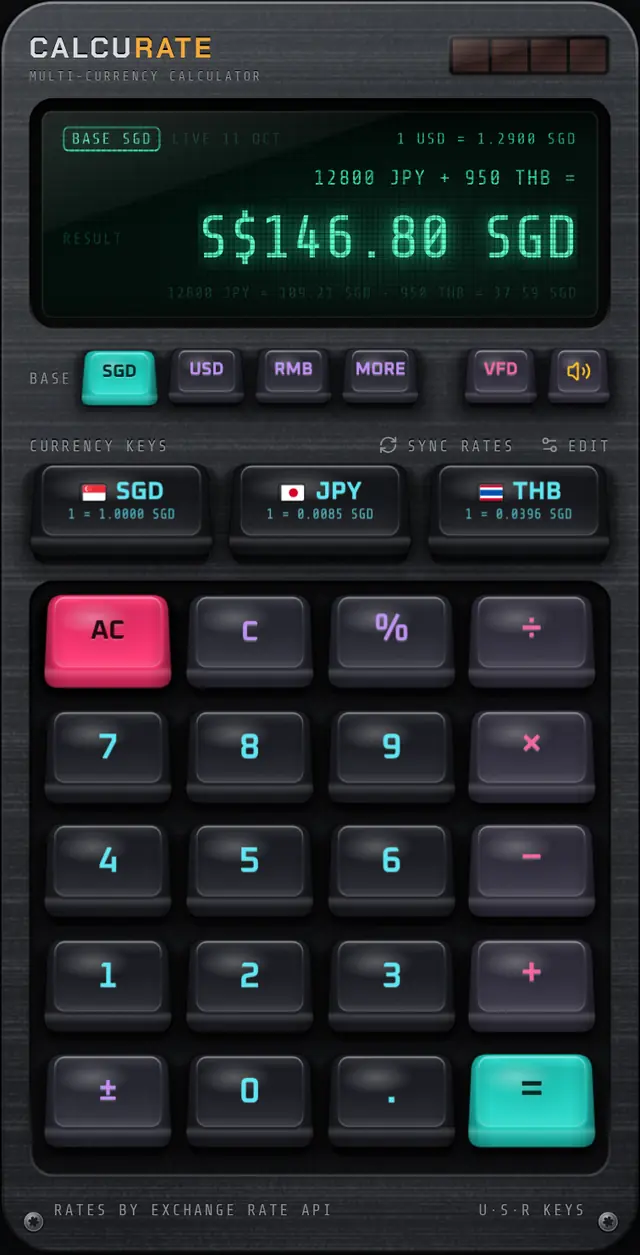
Calcurate is a multi-currency calculator app for iPhone, iPad and Android. You can add, subtract, multiply and take percentages of amounts in different currencies in one calculation, and get the answer in your chosen base currency using live exchange rates.
Can I add different currencies together in one calculation?
Yes. Type an amount, tap its currency key, and continue with the next amount in another currency, for example 120 USD + 85 SGD + 300 RMB. When you press equals, every amount is converted to your base currency and totalled, with a breakdown of each conversion.
Which currencies does Calcurate support?
Calcurate supports 15 currencies: US dollar, Singapore dollar, Chinese yuan (RMB/CNY), euro, British pound, Japanese yen, Australian dollar, Canadian dollar, Hong Kong dollar, Swiss franc, Thai baht, Malaysian ringgit, South Korean won, Indian rupee and New Taiwan dollar.
Where do the exchange rates come from?
Calcurate uses daily mid-market rates from ExchangeRate-API, falls back to European Central Bank reference rates via Frankfurter, reuses rates it fetched in the last hour, and uses rates bundled with the app when it cannot get fresh ones. The display shows where the rates came from and, for live rates, the date they were published.
Does Calcurate work offline?
Yes, the calculator works without a connection. Rates fetched in the last hour are reused; after that, with no connection, it uses rates bundled with the app and the display says OFFLINE. Bundled rates can be out of date, so treat offline conversions as rough estimates and tap SYNC RATES when you are back online.
Do I need an account?
No. There is no sign-up. Your settings, such as base currency, currency keys, display tint and keycap set, are saved on your device.
Is there a currency widget?
Yes. On iOS there is a Currency widget in small, medium and large sizes, and on Android there are Exchange Rate (2×2) and Quick Convert (4×4) widgets. The large widget has a number pad that converts amounts right on the home screen.
Is Calcurate available on iPhone and Android?
Yes. Calcurate is available on the App Store for iPhone and iPad, and on Google Play for Android.
Can I change the base currency after calculating?
Yes. With an answer on screen, tap a different base currency and the answer is recalculated in that currency immediately. Only amounts tagged with a currency are reconverted; plain numbers always count as the current base currency.
Which currencies can be the base currency?
Twelve: SGD, USD and RMB have their own keys, and the MORE key cycles through EUR, GBP, JPY, AUD, CAD, HKD, CHF, THB and MYR. KRW, INR and TWD can be used as quick currency keys in calculations.
How many currency keys can I have?
Up to three quick currency keys at a time. Tap EDIT above the keys to choose any three of the 15 supported currencies. To swap one, remove it first.
How does the percent key work?
Like a desk calculator: 200 + 10% = 220, 200 − 15% = 170, and 80 × 25% = 20. It is designed for tax, service charges, tips and discounts.
How often are exchange rates updated?
The main source publishes daily and the ECB fallback each working day. Calcurate caches rates for an hour, and SYNC RATES fetches fresh rates whenever you want.
Why is the rate different from my bank or card statement?
Calcurate shows mid-market reference rates. Banks, card networks and exchange counters often add a margin or fee on top, so the rate you are charged is usually a little worse.
Does Calcurate convert or send money?
No. Calcurate is a calculator. It does not move money, connect to bank accounts or give financial advice.
How do I change the keycaps?
Hold any key for 3 seconds until its cap pops off, swipe through the six sets, and tap INSTALL. PUT BACK cancels.
How do I mute the key sounds?
Tap the speaker key next to the display tint key. Your choice is saved.
Why does my iPhone widget say OPEN APP FOR RATES?
The iOS widget receives rates from the app. Open Calcurate once after installing and the widget will show rates from then on.
Does Calcurate collect my data?
Calcurate does not require an account and keeps your settings on your device. It downloads exchange rates from public rate services. See the privacy policy for details.
Does Calcurate work on iPad?
Yes. Calcurate supports iPad as well as iPhone.
Download
Your next trip deserves a better calculator.
Mix currencies in one sum, see every conversion, and enjoy pressing the keys. Calcurate is on the App Store and Google Play.