Best Currency Calculator App: A Buyer's Checklist for 2026
The best currency calculator app lets you mix currencies in one sum, shows where its rates come from and works offline. Use this checklist before you install.
The best currency calculator app for you is one that lets you add amounts in different currencies in a single calculation, tells you where its rates come from and how old they are, and keeps working when you are offline. After that, look at home screen widgets and whether the keypad is pleasant enough that you will actually use it.
- A converter handles one amount at a time; a currency calculator lets you add, subtract and multiply amounts in different currencies in one go.
- Check that the app shows its rate source and the date the rates were published, not just a number.
- Offline behaviour matters most when you need it: abroad, underground or on a plane.
- Mid-market reference rates are a fair yardstick, but your bank or card may charge a different rate.
- Widgets and a comfortable keypad decide whether you reach for the app in the moment.
Searching for the best currency calculator app gets you a long list of tools that look alike in screenshots. The differences only show up when you are standing at a counter with a receipt in one currency, a hotel bill in another and a budget in a third. This checklist covers the five things that separate a useful app from one you delete after a trip, and shows how Calcurate handles each one so you have a concrete reference point.
What makes a currency calculator app good?
A good currency calculator app does real arithmetic across currencies, is open about its exchange rates, keeps working offline, gets you an answer quickly from your home screen, and feels good enough to use without thinking. Price lists, ad placement and the number of currencies matter too, but those five decide whether the app helps in the moment.
Run through the sections below with any app you are considering. If it fails the first two, keep looking.
1. Can you mix currencies in one calculation?
This is the main test. Many apps are converters: you type one amount, pick a currency and read off the result. That is fine for checking a single price. It falls apart when you need a total of several prices in different currencies, because you end up converting each one, writing it down and adding them up yourself.
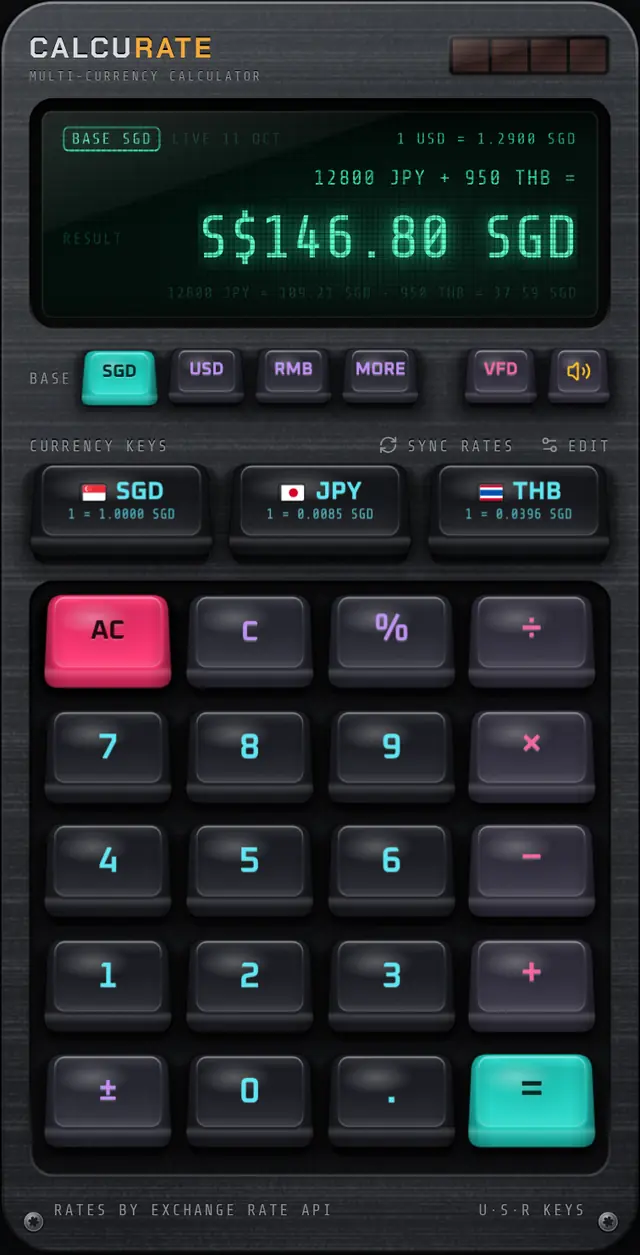
A true currency calculator lets you type a whole sum with each amount tagged in its own currency and gives you one answer. In Calcurate you type an amount, tap a currency key to tag it, then carry on with an operator and the next amount.
That example uses illustrative rates of 1 USD = 1.30 SGD and 1 RMB = 0.18 SGD, with SGD as the base currency. The display also shows a breakdown line with each conversion, so you can see that 120 USD became 156.00 SGD and 300 RMB became 54.00 SGD.
Things to check in any app:
- Operator precedence. Does
45 EUR × 3 + 20 EURgive 155 EUR, or does the app add before it multiplies? - Percentages. Can you add a service charge or take off a discount in one step? Calcurate handles this like a desk calculator:
200 + 10%gives 220 and200 − 15%gives 170. - Fixing mistakes. If you tag an amount with the wrong currency, can you retag it without retyping? A good app lets you tap a different currency key straight after the amount.
- Switching the answer currency. Can you see the same total in another currency without starting again?
For more on why this matters, see how to add prices in different currencies and the multi-currency maths feature page.
2. Does the app tell you where its rates come from?
You should be able to see the source of the rates and how recent they are, right where you read the answer. A bare number with no date is a guess you cannot check.
Questions to ask:
- Which provider? Reputable apps name their data source.
- How often is it updated? Daily is normal for reference rates. Faster updates rarely matter for a coffee or a hotel bill.
- What kind of rate is it? Most apps show mid-market reference rates, the midpoint between buy and sell prices. Banks, card networks and exchange desks usually apply their own rate, sometimes with fees on top, and policies vary. Our guide to the mid-market rate explains the gap.
- What happens if the source is down? A backup source is a good sign.
Calcurate uses live rates from ExchangeRate-API, updated once a day, and falls back to European Central Bank reference rates via Frankfurter if that is unavailable. The display shows the source and publication date, for example LIVE 10 OCT or ECB 09 OCT. Details are on the live exchange rates page.
Tip: Treat any app's rate as a benchmark. If a shop, card terminal or exchange desk offers you a rate far from it, that difference is what you are paying for the convenience.
3. What does the app do when you are offline?
The app should keep calculating without a connection and tell you clearly when its rates are not fresh. You are most likely to need a currency calculator exactly when your connection is weakest: on arrival before you buy a SIM, on a train through tunnels, or with roaming switched off to save money.
Check three things:
- Does it store rates on the phone, and how long does it keep relying on them?
- If it has never been online, does it still work with some built-in rates?
- Does it warn you when the rates are not fresh?
Calcurate caches rates on the device for an hour and reuses them within that hour without going online. If it cannot connect after that (or has never been online), it uses rates bundled with the app and the display says OFFLINE, so you always know which kind of figure you are looking at. Bundled rates are fixed when the app version is released and go out of date, so treat OFFLINE results as rough estimates. You can also press SYNC RATES to fetch fresh rates whenever you are connected. Our offline currency converter guide covers how to prepare before a trip.
4. Can you convert from the home screen?
A widget saves you opening the app for quick checks, which is most checks. When you are comparing prices in a shop, the rate on your home screen is often all you need.
Look for widgets that show the rate both ways (so you do not have to invert it in your head), a few common amounts converted, and ideally a way to type an amount directly.
Calcurate's widgets come in three sizes. Small shows the rate both ways, Medium adds three round amounts converted, and Large puts a number pad on your home screen so each key press updates the converted result without opening the app. On iOS the widget is called Currency and the Large size's number pad needs iOS 17 or later. On Android there are Exchange Rate and Quick Convert widgets. See the home screen widgets page for setup.
5. Does it feel good to use?
Feel sounds like a luxury, but it decides whether you open the app or just guess. Small things add up: keys big enough to hit while walking, feedback that confirms a tap registered, a clear display you can read in sunlight, and no account wall before your first sum.
Calcurate is built around a mechanical keyboard keypad. Each key is drawn as a real keycap, drops as you press it and fires on the way down like a real switch, with recorded mechanical switch sounds and a haptic tap on phones. A mute key turns the sound off. You can swap between six keycap sets in Keycap Studio and choose from three display tints. There is no sign-up, and settings stay on your device.
A quick checklist to compare apps
| Question | What a good answer looks like |
|---|---|
| Can I mix currencies in one sum? | Yes, with each amount tagged and one total in a currency you pick |
| Can I see the rate source and date? | Named provider and publication date on screen |
| What happens offline? | Uses stored rates and labels them clearly |
| Is there a widget? | Rate both ways, ideally with direct amount entry |
| Do percentages and precedence work? | 200 + 10% gives 220; × before + |
| Do I need an account? | No sign-up for basic use |
| Does it cover my currencies? | Check the list before you travel |
On that last point, every app has a fixed list. Calcurate, for instance, covers 15 currencies, including USD, EUR, GBP, JPY, SGD, RMB, KRW and THB; the full list is on the currencies page. If your trip involves a currency outside an app's list, that app is the wrong tool for that trip, however good it is otherwise.
Which app should you choose?
Choose the one that passes the first three tests for the currencies you actually use. If you only ever convert a single price, a basic converter will do. If you add up bills, split costs or work out a budget across currencies, a calculator that mixes currencies in one sum will save you the most time. Download two candidates, try the same three-currency sum in each, and keep the one that gets you the answer with the fewest taps.
FAQ
Questions people also ask
What is the difference between a currency converter and a currency calculator?
A converter turns one amount into another currency. A currency calculator also does arithmetic, so you can add 120 USD and 85 SGD and get a single total in the currency you choose.
Do currency calculator apps show the rate my bank will charge?
Usually not. Most show mid-market reference rates, which sit between buy and sell prices. Your bank or card provider may apply its own rate and fees, so treat the app figure as a benchmark.
Can a currency calculator app work without internet?
A good one keeps calculating offline, using rates stored on your phone or bundled with the app. Look for an app that clearly tells you when it is using stored or bundled rates rather than fresh ones.
Do I need an account to use a currency calculator app?
Not necessarily. Some apps, including Calcurate, need no account or sign-up and keep your settings on the device.